

Create a new page
Pages allow you to add custom content to your website, such as an about page, contact page, or any other information you want to share with visitors.
Pages allow you to add custom content to your website, such as an about page, contact page, or any other information you want to share with visitors.
Creating a page
- Click Pages in the left navigation.
- Click New page to open the page editor.
- Enter a title in the Page title field (1).
- Add your content using the text editor (2).
- Click Save changes (3) to create the page.
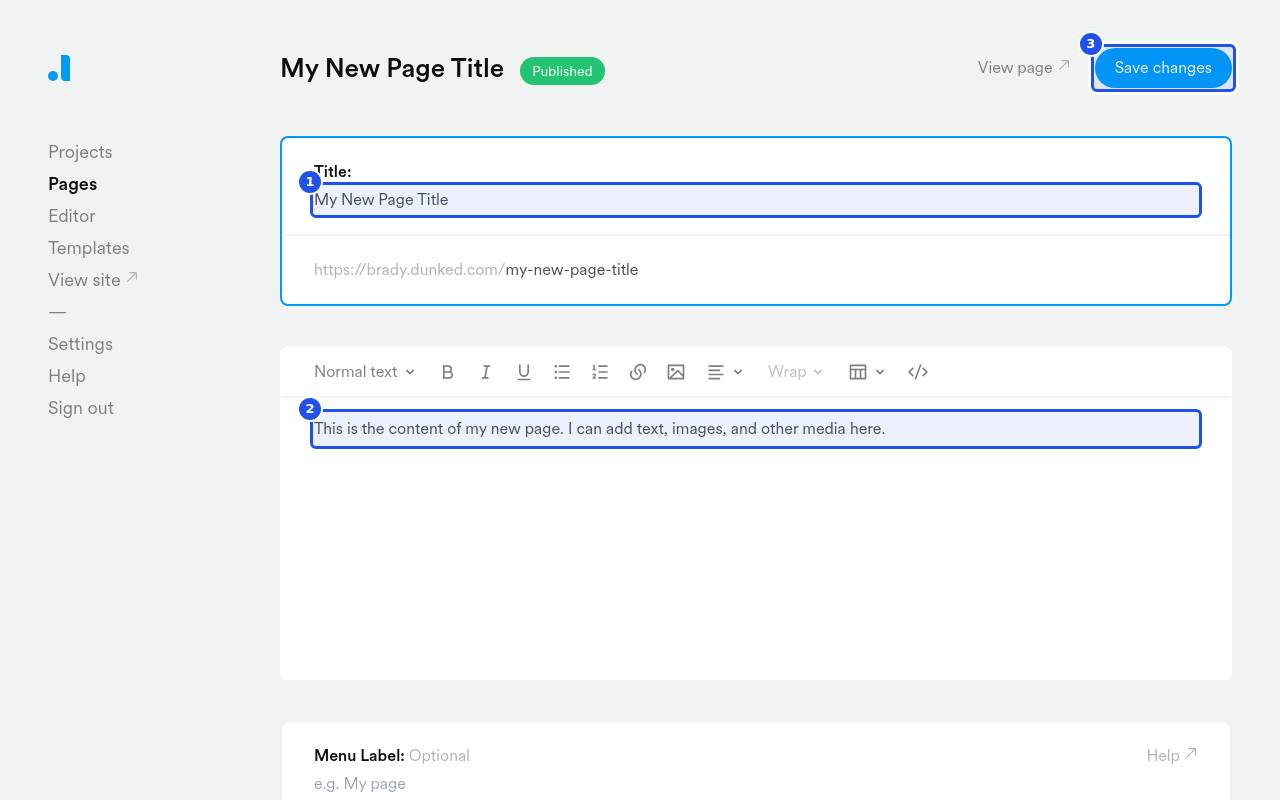
By default, the page title is used to generate the page's URL. If you want the URL to be different from the title, you can edit both the title and the URL slug after the page has been saved for the first time.
You can also create custom layouts within your page content using simple HTML and class names.
Embed an Elfsight widget
You can add an Elfsight widget, such as a social feed or reviews, to a page. Elfsight is currently the only supported widget provider.
- In Elfsight, open your widget, click Add to website and copy the full embed code.
- In the text editor toolbar, click Embed a widget (the grid icon).
- Paste the code and click Insert.
- Click Save changes.
You can also paste the Elfsight embed code straight into the text editor.
In the editor, the widget appears as an Elfsight widget card marked "Shows on your live site". The widget itself only displays on your live site. Drag the card to move the widget, or select it and press Delete to remove it.
If you see "That doesn't look like Elfsight embed code", the code you pasted doesn't contain an Elfsight widget. Copy the full code again from the Elfsight Add to website dialog.
You can embed Elfsight widgets in project descriptions the same way.
Additional page options
After entering your page title and content, you can configure additional options:
Menu Label
By default, your page title will appear in your site navigation. Enter a Menu Label if you want the navigation to display a different label than the page title. For example, you might create a page titled "Get in touch" with a menu label of "Contact".
Page Redirect
Enter a Page Redirect URL if you want the page to redirect visitors to another URL. Check Open in new window if the redirect should open in a new browser window.
When a redirect URL is entered, the content editor is hidden, since redirect pages don't display any content. To turn a redirect page back into a content page, clear the Page Redirect field and the content editor will reappear. For more details, see Set up a page redirect.
Contact Form
Check Add a contact form to this page to include a contact form on the page.
Password Protection
Check Protect this page with a password or private links to require a password for visitors to access the page.
SEO Settings
Enter an SEO Title and SEO Description to control how the page appears in search engine results. Use Generate with Dunked AI to automatically generate SEO content based on your page.